Google Sheets Addon
Connect TikTok Ads to Google Sheets
By SyncWith
TikTok Ads to Google Sheets: your numbers, not just your leads
TikTok Ads Manager can already send lead form entries to Google Sheets. Your client report needs spend, clicks and conversions too, by campaign, ad group or ad. SyncWith pulls those into Google Sheets from one ad account or many and refreshes them hourly or daily. Free to get started.
Install the Addon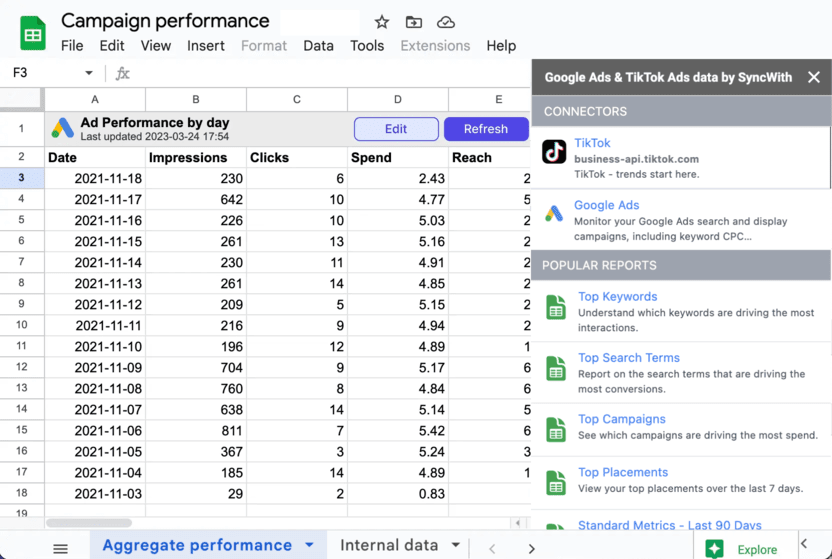
How do I connect TikTok Ads to Google Sheets?
- Install SyncWith from the Google Workspace Marketplace (in Sheets: Extensions > Add-ons > Get add-ons), then open it from the Extensions menu.
- Sign in to TikTok Ads and pick the ad accounts you want.
- Choose your TikTok fields, pick a date range and run the report. A good starting set is Date and Campaign with Cost, Impressions, Clicks (destination), Conversions and Cost per conversion.
- Set a schedule. After your first one, SyncWith asks for background access. Allow it.
What you can pull from TikTok Ads into Google Sheets
 TikTok Ads Cost, impressions, reach, CTR, conversions, video views and more, broken out by campaign, ad group, ad and advertising objective.
 Google Ads Running Google Ads too? The same add-on pulls your Google Ads campaigns, ad groups and keywords with spend, clicks, impressions, CTR and CPC. See Google Ads to Google Sheets.
Export TikTok Ads to Google Sheets on a schedule
TikTok Ads Manager can email you a custom report as a file on a schedule (Analytics tab, Custom reports, Scheduled running). You still download the file and import it into your sheet by hand, and only people with Ads Manager access can download it. SyncWith skips the inbox: the numbers land in the sheet hourly, daily, weekly or monthly.
We charge for refreshes, not accounts. A refresh is one run of one report, however many ad accounts it covers. TikTok reports refresh a lot. In Q3 2026, the average active TikTok Ads report on SyncWith refreshed about 150 times, or 50 a month. That's more than once a day. The free Hobby plan's 35 refreshes a month are enough to try the setup on a real account. Business is $24.99 a month for 100 refreshes: about two reports at that pace, or three daily ones. Its reports never expire. An hourly report fits Business+ ($49.99 for 1,000). See all plans.
TikTok Ads to Looker Studio
Building the report in Looker Studio instead? Our TikTok Ads connector is in Looker Studio's connector gallery. It's part of SyncWith for Looker Studio, which gets you every connector and unlimited ad accounts for $24.99 a month after a 14-day free trial. See all SyncWith Looker Studio connectors.